The story behind Envelope Accessibility™ – In Concept.
I recently launched Envelope Accessibility™ – In Concept, and I’m so excited about it that I decided to write about why I’m so excited about it and why I think it’s so significant in this new era of email, where drag-and-drop is increasingly becoming the tool of choice.
The achievability of accessibility in email.
You don’t have to look further than this year’s Email Markup Consortium Accessibility Report to realise that accessibility in email is a challenge. So, it raises the question: is accessibility in email achievable? The answer is yes, of course it is! However, it’s easier to achieve if everyone in the email creation process is involved.
Is accessibility in email achievable? Yes, of course it is!
The burden has been on the builders.
For the most part, it seems that the ones bearing most of the burden of accessibility in email have been those building the emails – the developers. It’s often fallen to them to avoid failure when it comes to conformance and compliance in the code they create. However, accessibility should be considered and thought through well before code is created, by the copywriters and designers, at concept stage.
Accessibility should be considered and thought through by the copywriters and designers.
Copywriting accessibly.
Copywriting plays an important part in ensuring that email content is accessible. Headlines, headings, paragraphs, lists and their relative lengths are some examples. Links and buttons that recipients use to respond to emails are others. However, when it comes to copywriting, the thing that’s overlooked most is alternative text, because it’s only ‘visible’ in the code.
The thing that’s overlooked the most is alternative text, because it’s only ‘visible’ in the code.
Designing accessibly.
Designing plays an important part in ensuring that email content is accessible. Typography, iconography, illustration and photography are some examples. Content has to be easy to read (and easy to listen to), and easy to engage with on mobile, tablet and desktop devices, in light and dark mode. The aim is to ensure that your recipients can consume your emails without having to put in any unnecessary effort.
The aim is to ensure that a recipient can consume your email without having to put in any unnecessary effort.
Introducing Envelope Accessibility™ – In Concept.
This is where Envelope Accessibility™ – In Concept comes in. Supporting copywriters and designers as they implement accessibility into emails, at the concept stage, before it gets more complex and more costly. It catches content that doesn’t conform to the Web Content Accessibility Guidelines (WCAG) and that isn’t conducive to creating an effortless experience for your recipients.
This is where Envelope Accessibility™ – In Concept comes in. Supporting copywriters and designers as they implement accessibility into emails at the concept stage, before it gets more complex and more costly.
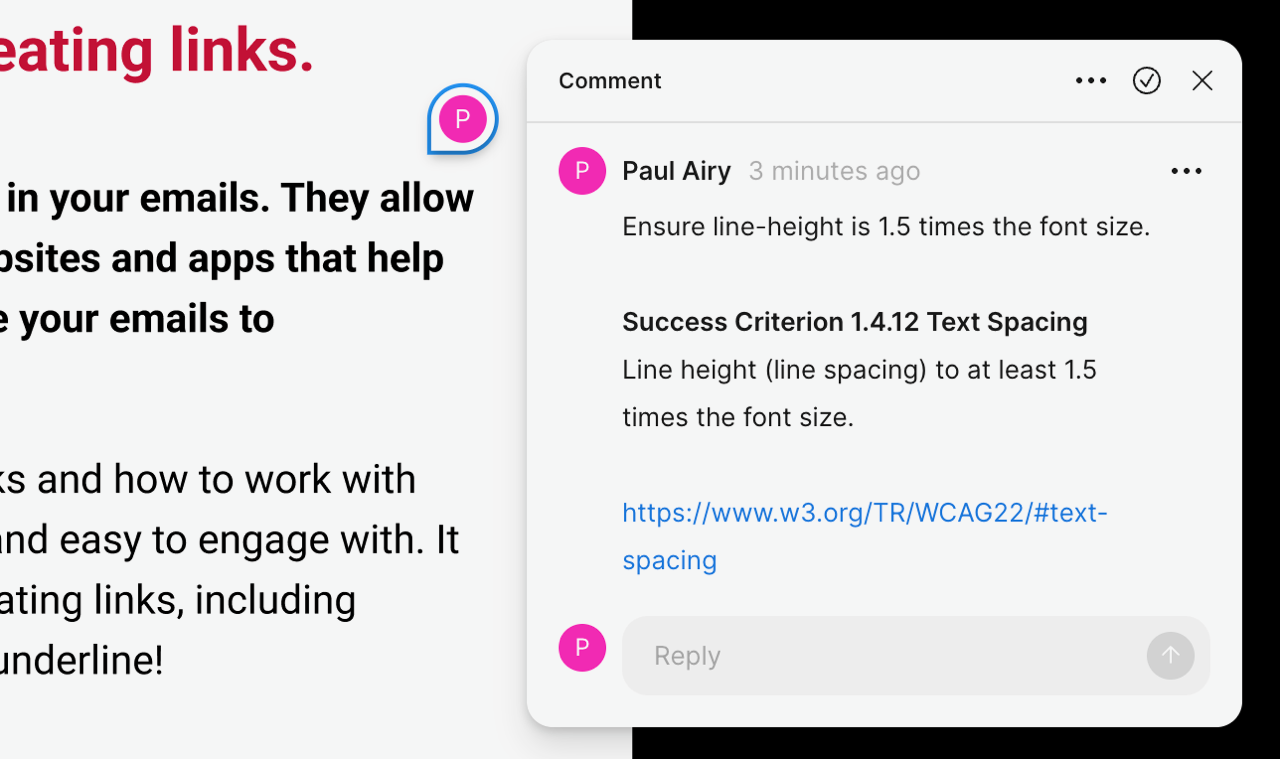
Issues are called out in context, in tools like Figma. The commenting tool in Figma is used to identify what needs to be attended to on an email’s content for it to conform to the Web Content Accessibility Guidelines (WCAG), levels A, AA, and, where applicable, AAA. It also includes a link to any relevant WCAG Success Criterion for further context. Addressing accessibility at this stage allows you to implement accessibility in your tool of choice.
The tools of choice, when it comes to creating emails, are increasingly becoming drag-and-drop tools, like Stripo.
The tools of choice, when it comes to creating emails, are increasingly becoming drag-and-drop tools, like Stripo, which make use of modules that are pre-coded and pre-tested. This makes it easy to assemble emails without the need to know how to code HTML and CSS for email. HTML email coding still has a part to play when there’s a need to create custom modules.
This makes it easy to assemble emails without the need to know how to code HTML and CSS.
Drag-and-Drop accessibility.
Having established at the concept stage that your email’s content is accessible, with Envelope Accessibility™ – In Concept, it makes implementing accessibility into your emails in drag-and-drop tools, like Stripo, much easier, as much of it, like line-height, can be embedded into pre-coded and pre-tested modules. This allows you to integrate WCAG-conformant accessibility in Stripo with confidence.
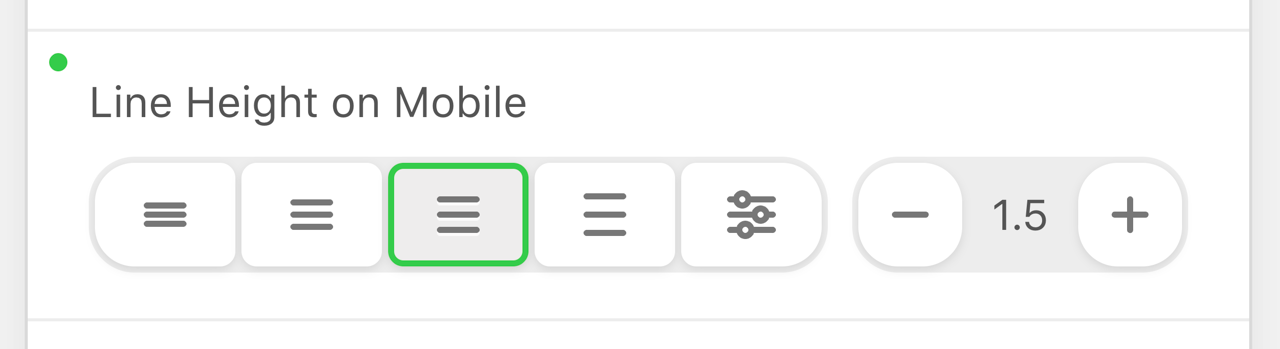
Knowing what accessibility to apply using Envelope Accessibility™ – In Concept allows you to integrate WCAG-conformant accessibility in Stripo with confidence.
It’s only when you need something specific, such as a brand-bespoke email design system or module for that design system, that you’ll need to call on HTML email coding. Other than that, with guidance from Envelope Accessibility™ – In Concept, you can have drag-and-drop accessibility.
Accessibility – achievable for all.
All this makes accessibility achievable for all. It empowers you with the ability to conform to the WCAG and to comply with the local laws in place in your part of the planet, such as in Europe (European Accessibility Act), in the United States of America (Americans with Disabilities Act) and in the United Kingdom (Equality Act 2010).
All this makes accessibility achievable for all.
That’s what makes Envelope Accessibility™ – In Concept and Stripo powerful partners. Together, they make accessibility easier.